
What's new since Notational Velocity
Notational Velocity was last released in 2011. Kinetic Notes is not that build rehosted — it is the same application rebuilt to run on current Macs, with its dead and Intel-only dependencies replaced and nothing removed that anyone was using.
Here is the work, release by release. All of it is in the public changelog, and all of it is in the source.
- releases since the fork
- 7releases since the fork
- architectures, both native
- 2architectures, both native
- third-party runtime dependencies
- 0third-party runtime dependencies
- localizations carried forward
- 7localizations carried forward
The problem
A 2011 build cannot survive macOS 26.
This is the part that matters most, because it has a deadline attached.
Notational Velocity 2.0 β7 was compiled for PowerPC, 32-bit Intel and 64-bit Intel. Apple Silicon did not exist yet, so there is no arm64 code in it at all. On any Mac sold in the last five years it therefore runs through the Rosetta 2 translation layer.
Rosetta 2 is being withdrawn after macOS 26 Tahoe. When that happens, the 2011 build stops launching — not slowly, not with a warning, but entirely. Everything on this page follows from that fact.
Version 1.0
Made to run on a modern Mac.
The first release dealt with everything that stopped the application working at all.
Universal binary, natively on Apple Silicon
Notational Velocity's final build ships ppc, i386 and x86_64 code and no arm64 slice, so on a modern Mac it runs only under Rosetta 2 — which is being withdrawn after macOS 26 Tahoe. Kinetic Notes compiles arm64 and x86_64 into one binary, both native. Rosetta is neither required nor used.
OpenSSL replaced with CommonCrypto
The bundled OpenSSL dependency is gone, replaced by Apple’s own CommonCrypto. The encryption format is unchanged and compatible in both directions, so a database encrypted by Notational Velocity still opens.
AutoHyperlinks replaced with NSDataDetector
Another dead Intel-only dependency removed. Link detection now uses the system’s own data detectors, which are maintained by Apple and understand more than the original library did.
Sparkle removed, then rebuilt
The update framework came out in 1.0 because the signing infrastructure to do it safely was not in place yet, and an unsigned updater is worse than none. It returned in 1.6 with an Apple Developer ID behind it and signature checks on every download.
Dark Mode
The interface follows your system appearance — added in 1.0 and extended in 1.5, where column headers gained opaque backgrounds and list grid lines began following the system appearance properly.
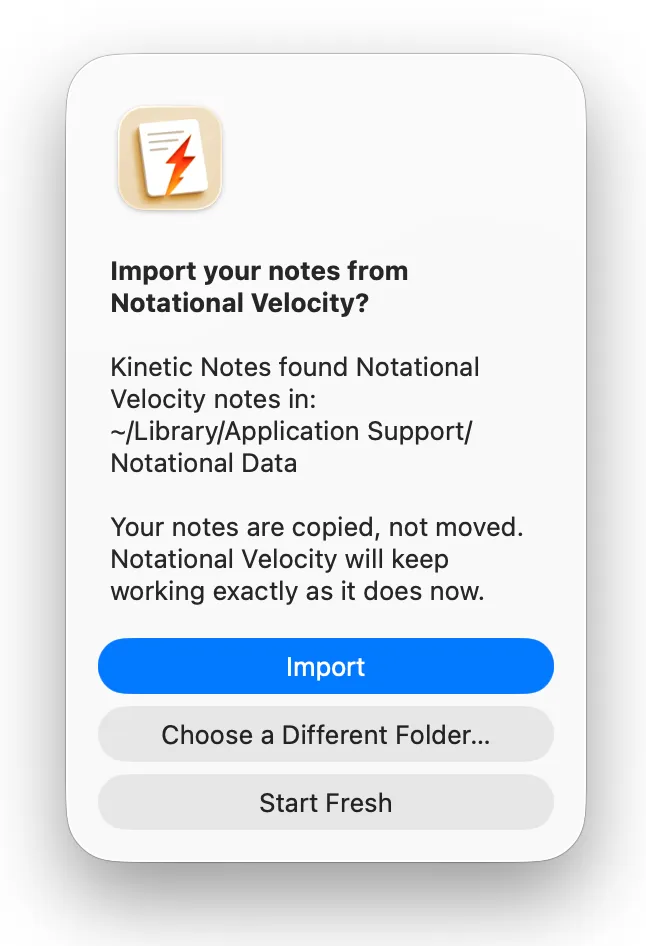
First-run import assistant
On a genuine first launch, Kinetic Notes offers to import an existing Notational Velocity notes directory, encrypted databases included. It copies rather than moves and never writes to the original data.
Migration
Your old notes, copied — never moved.
The import assistant exists because asking someone to trust a fork with fifteen years of notes is a big ask. So it does the cautious thing by default.
- It copies. Your Notational Velocity folder is left exactly as it was.
- It never writes to Notational Velocity’s data at any point.
- Encrypted databases can be imported — you supply the passphrase.
- Both applications can stay installed indefinitely, side by side.
Version 1.8
Line numbers and a word count.
Both are off until you want them, in Settings → Editing, and neither changes a character of what is saved.
Line numbers
A gutter beside the note, with the line under the cursor highlighted. The numbers are drawn beside the text rather than added to it, so they are never copied, printed or exported, and a wrapped line is numbered once.
A word count, or whatever you would rather count
A bar along the bottom of the window counting the open note. Click it to switch between characters with or without spaces, words, lines and paragraphs — the choice is remembered.
Version 1.7
Dark Mode on your terms, and updates in one place.
A release about Settings: new controls for appearance and updating, and the spots where Dark Mode made text unreadable.
A Color Scheme control
Settings → Fonts & Colors can pin the whole application to light or dark regardless of the system setting, or leave it following macOS, which is the default. The choice applies immediately and is remembered.
Updates get their own pane
Settings → Updates gathers a Check Now button, a toggle for checking automatically, and an Auto-Update toggle that downloads and installs updates on its own. Before, these were only reachable from the application menu.
- Dark Mode no longer hides text in Settings: the Body Font name and the Notes → Storage tables were drawn in colours meant for a light background.
- Deleting the note you searched for no longer leaves an empty list — the stale search is cleared and the remaining notes reappear.
- All five Settings tabs use SF Symbols and stay visible, rather than collapsing into a » overflow menu.
Version 1.6
Signed, notarized, and able to update itself.
The last thing standing between the project and an ordinary install was a signing certificate. With one in place, two problems closed at once.
Signed and notarized
Builds carry an Apple Developer ID and are notarized by Apple, so 1.6 opens normally on first launch. The right-click → Open workaround earlier versions needed is gone.
It updates itself, and checks what it installs
Every download is verified against a signing key built into the application before it is unpacked, and anything failing that check is discarded rather than installed. Nothing is measured: no profile of your system is sent, and no record is kept of who was offered what.
An indicator, not a dialog
When a scheduled check finds a new version, an Update Available button waits in the toolbar until you are ready, rather than interrupting what you opened the app to do. Checking manually still answers straight away.
The title bar is stacked again
The window title sits on its own row with the search field full-width beneath it, the way Notational Velocity had it. That was never removed on purpose — macOS 11 redefined how toolbars are drawn and folded the two rows into one. The side-by-side layout is still available in Settings.
Version 1.5
The file handling, rebuilt.
Version 1.5 replaced the Carbon-era internals. The storage formats did not change and were verified compatible in both directions, but the code underneath them was new, so it shipped as a beta first. That testing is done.
The Carbon File Manager is gone
The deprecated Carbon API that handled note storage has been replaced. Two Carbon calls remain, for resolving Alias Manager records and reading volume creation dates — we would rather name them than claim the job is fully finished.
Path-based addressing
Notes are addressed by path instead of opaque FSRef handles, which is what made the rest of the modern file handling possible.
Atomic saves
Saving goes through scratch files, so a write cannot land half-finished — no more truncated notes if something interrupts a save.
Faster folder scanning
Directory scanning uses getattrlistbulk(2), which reads a folder in far fewer system calls than the file-at-a-time approach it replaced.
NSURL bookmarks for the notes folder
The notes folder location is stored as an NSURL bookmark, with backward compatibility for existing preferences, so it survives being moved or renamed.
NSSecureCoding for archiving
Archiving moved to NSSecureCoding with byte-identical output — a safer deserialization path that changes nothing about your files.
Modern Keychain access
Keychain access uses SecItem now. Existing passphrases keep working.
Current Trash and Finder APIs
Deleting and revealing notes go through today’s APIs rather than deprecated ones.
Polish
And the small things.
The unglamorous work that makes an old application stop feeling old.
- All alerts rebuilt on NSAlert, across 38 call sites — the old Carbon-era dialogs are gone.
- Typographic quotes restored in 14 alerts and undo names.
- Welcome notes rebranded across all seven localizations.
- Spanish added as a seventh locale, with complete translations.
- Obsolete Leopard and Snow Leopard runtime checks removed.
Still moving.
7 releases, each with a written changelog and a build number that maps to the pull request that shipped it. Version numbers are honest: 1.5 shipped as a beta first because it touched the storage layer.
Free and open source.Support the projectif it is useful to you.